Building Generative AI Containers with Podman
Authors: Bobby Johns, David Kypuros, and Jason Nagin
Series Index
In this series, we will be offering our practical advice on implementing Generative AI (GenAI) solutions using containers (Podman) and on a container orchestration platform (OpenShift). In this series, we will cover:
- Introduction to Generative AI and Containerization with Podman and OpenShift
- Preparing Your AI Lab Environment with Podman and OpenShift
- Building Generative AI Containers with Podman
- Setting Up a Vector Database with Podman and OpenShift
- Leveraging LangChain and CamelK for Business Value
- Business Benefits of the AI Lab Environment
In this 6 part series, we will incorporate practical examples, code snippets, and best practices throughout the articles. Additionally, we will emphasize the importance of a well-structured AI lab environment in achieving business objectives, showcasing how each component contributes to these goals.
Episode 3: Building a Generative AI Containers with Podman
In this episode, we delve into the exciting world of Generative AI in containers as we explore “Building Generative AI Containers in Podman.” This guide takes you on a journey to create self-contained, shareable, and powerful Generative AI environments using Podman containers. Whether you’re a seasoned AI professional or just getting started, we provide insights and tools to simplify your AI adventures.
Prerequisites: Ensure you have a Fedora system with Python, pip, and Podman installed. If you completed the tasks in the previous post, “Preparing Your AI Lab Environment with Podman and OpenShift” you should have the required setup. Specifically setting up Podman.
We will be using the OpenAI API so you’ll need an OpenAI account and an API Key. The free one will be fine, but a paid account also works.
Python Virtual Environment
We start by creating a Python virtual environment to manage dependencies. This step offers benefits such as isolation, version management, efficient dependency management, sandboxing, portability, easy cleanup, and development isolation.
# Create Python Virtual Environment with chromadb


python -m venv venv-chroma


source venv-chroma/bin/activate


pip install chromadb langchain beautifulsoup4 lxml openai
ChromaDB Container
Next, we build a ChromaDB container from the Git source. The Containerfile defines the container image creation process, emphasizing best practices for building containers.
mkdir chroma-container


cd chroma-container


mkdir bin


touch bin/container_entrypoint.sh


chmod +x bin/container_entrypoint.sh


touch requirements.txt


touch Containerfile
Insert the following text block into the Containerfile.
cat <<EOF > Containerfile


FROM python:3.10-slim-bookworm as builder


RUN apt-get update --fix-missing && apt-get install -y --fix-missing


build-essential


gcc


git


g++ &&


rm -rf /var/lib/apt/lists/*


RUN mkdir /install


WORKDIR /install


COPY ./requirements.txt requirements.txt


RUN git clone https://github.com/chroma-core/chroma.git /chroma-git


RUN pip install --no-cache-dir --upgrade --prefix="/install" -r requirements.txt


FROM python:3.10-slim-bookworm as final


RUN apt-get update --fix-missing && apt-get install -y --fix-missing


build-essential


gcc


g++ &&


rm -rf /var/lib/apt/lists/*


RUN mkdir /chroma


WORKDIR /chroma


COPY --from=builder /install /usr/local


COPY --from=builder /chroma-git /chroma


COPY ./bin/container_entrypoint.sh /container_entrypoint.sh


# Ensure the entrypoint script is executable


RUN chmod +x /container_entrypoint.sh


EXPOSE 8000


CMD ["/container_entrypoint.sh"]


EOF
This Containerfile is used to build a container image for a Python application.
What does this Containerfile define?
This Containerfile first creates a builder stage to install dependencies, clone a Git repository, and install Python packages. Then, in the final stage, it copies the necessary components from the builder stage, exposes a port, and sets the default command to run a Container entrypoint script. The purpose of this Containerfile is to create a containerized environment for a Python application based on the Chroma project without including all the temporary artifacts of the build process in the final container image. For more best practices on building containers see: Best practices for building images that pass Red Hat Container Certification
Requirements.txt and Entry Point
Create a file named “requirements.txt”
cat <<EOF > requirements.txt


chromadb


chroma-hnswlib==0.7.2


fastapi>=0.95.2, <0.100.0


graphlib_backport==1.0.3; python_version < '3.9'


importlib-resources


numpy==1.21.6


onnxruntime==1.14.1


overrides==7.3.1


posthog==2.4.0


pulsar-client==3.1.0


pydantic>=1.9,<2.0


pypika==0.48.9


requests==2.28.1


tokenizers==0.13.2


tqdm==4.65.0


typing_extensions==4.5.0


uvicorn[standard]==0.18.3


EOF
Create the container_entrypoint.sh file
cat <<EOF > bin/container_entrypoint.sh


#!/bin/bash


export IS_PERSISTENT=1


uvicorn chromadb.app:app --workers 1 --host 0.0.0.0 --port 8000 --proxy-headers


EOF
What is uvicorn, and why are we using it?
uvicornis a lightweight ASGI server designed for running Python web applications. It’s chosen for its speed, efficiency, ASGI support, compatibility, automatic workers, and WebSockets support.
Create volumes for ChromaDB and Flowise
# Create ChromaDB volumes


podman volume create chromadb-chroma


podman volume create chromadb-index_data


# Create a volume for Flowise


podman volume create flowise-volume
Building and Running ChromaDB Container
To build the ChromaDB container
# Build ChromaDB container


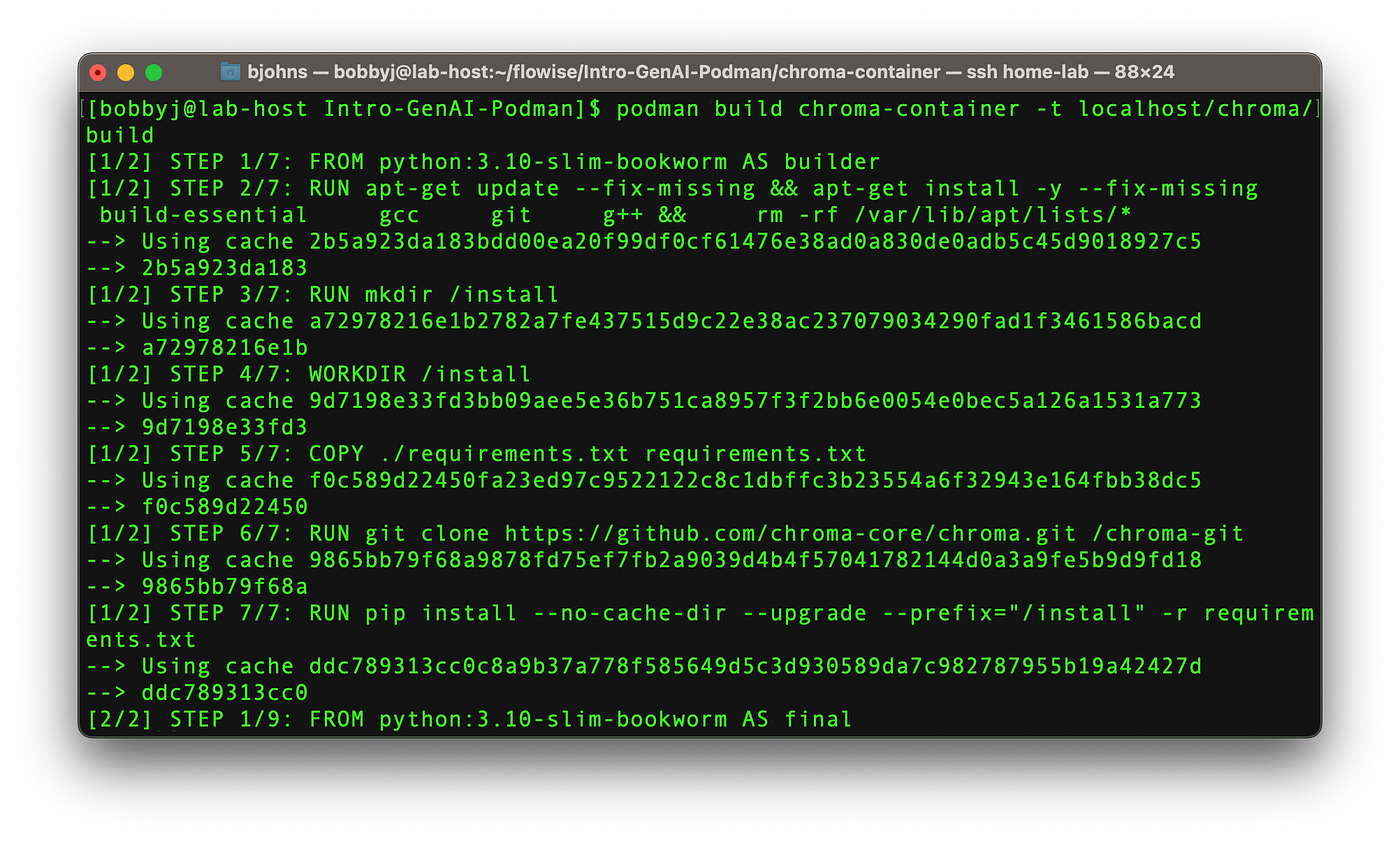
podman build . -t localhost/chroma/build
This will build the container image and store it in the local Podman registry. Expect output similar to this:
Start a ChromaDB Server
Start a ChromaDB Server in a Container with Podman.
podman run -d --rm


--name chromadb


-p 8000:8000


-v chromadb-chroma:/chroma


-v chromadb-index_data:/index_data


localhost/chroma/build
Start a Flowise Server
Start a Flowise Server in a Container with Podman
Because Flowise has a published version available on docker.io, we don’t have to create our own container image.
# Run Flowise server


podman run -d --rm --name flowise -p 3000:3000 flowiseai/flowise flowise start
You should be able to hit the URL of your ChromaDB with:
http://localhost:8000/api/v1/collections/And the URL of your Flowise with:
http://localhost:3000/Getting started with Flowise
(Be sure to add your OpenAI API credentials in Flowise as “OpenAI API” under the “Credetials” menu item.)
Create a collection name in your chromadb server to hold your local data.
cat <<EOF > collection_create.json


import chromadb


# Create a persistent Chroma client with the location of your Chroma DB.


persistent_client = chromadb.PersistentClient(path="http://localhost:8000/api/v1/")


# Create a collection called "test_collection".


collection = persistent_client.create_collection("dfw_summit_collection")


# Print a statement that the new collection exists.


print(f"Collection name: {collection.name}")


EOF
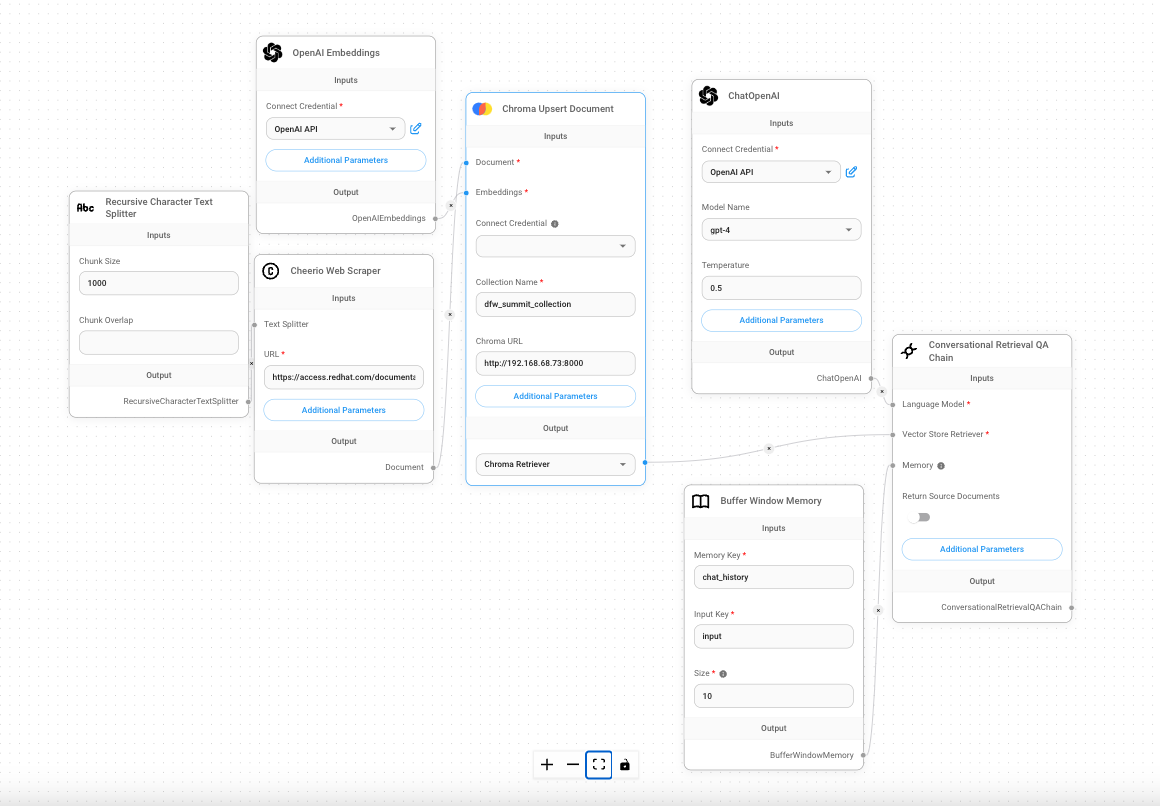
Below is a condensed JSON representation of a Flowise ChatFlow. Copy and paste this into your terminal window in the bash shell and it will create a file you can use to import the ChatFlow into your Flowise Web UI. (You can paste this into an IDE text editor and format the JSON into something more readable if you’re curious, but it’s not required.)
cat <<EOF > summit_2024_chatflow.json


{"nodes":[{"width":300,"height":330,"id":"openAIEmbeddings_0","position":{"x":-485.7532561700214,"y":420.8761308382209},"type":"customNode","data":{"id":"openAIEmbeddings_0","label":"OpenAI Embeddings","version":1,"name":"openAIEmbeddings","type":"OpenAIEmbeddings","baseClasses":["OpenAIEmbeddings","Embeddings"],"category":"Embeddings","description":"OpenAI API to generate embeddings for a given text","inputParams":[{"label":"Connect Credential","name":"credential","type":"credential","credentialNames":["openAIApi"],"id":"openAIEmbeddings_0-input-credential-credential"},{"label":"Strip New Lines","name":"stripNewLines","type":"boolean","optional":true,"additionalParams":true,"id":"openAIEmbeddings_0-input-stripNewLines-boolean"},{"label":"Batch Size","name":"batchSize","type":"number","optional":true,"additionalParams":true,"id":"openAIEmbeddings_0-input-batchSize-number"},{"label":"Timeout","name":"timeout","type":"number","optional":true,"additionalParams":true,"id":"openAIEmbeddings_0-input-timeout-number"},{"label":"BasePath","name":"basepath","type":"string","optional":true,"additionalParams":true,"id":"openAIEmbeddings_0-input-basepath-string"}],"inputAnchors":[],"inputs":{"stripNewLines":"","batchSize":"","timeout":"","basepath":""},"outputAnchors":[{"id":"openAIEmbeddings_0-output-openAIEmbeddings-OpenAIEmbeddings|Embeddings","name":"openAIEmbeddings","label":"OpenAIEmbeddings","type":"OpenAIEmbeddings | Embeddings"}],"outputs":{},"selected":false},"selected":false,"positionAbsolute":{"x":-485.7532561700214,"y":420.8761308382209},"dragging":false},{"width":300,"height":481,"id":"conversationalRetrievalQAChain_0","position":{"x":870.3499023746608,"y":1008.5688576728237},"type":"customNode","data":{"id":"conversationalRetrievalQAChain_0","label":"Conversational Retrieval QA Chain","version":1,"name":"conversationalRetrievalQAChain","type":"ConversationalRetrievalQAChain","baseClasses":["ConversationalRetrievalQAChain","BaseChain","Runnable"],"category":"Chains","description":"Document QA - built on RetrievalQAChain to provide a chat history component","inputParams":[{"label":"Return Source Documents","name":"returnSourceDocuments","type":"boolean","optional":true,"id":"conversationalRetrievalQAChain_0-input-returnSourceDocuments-boolean"},{"label":"System Message","name":"systemMessagePrompt","type":"string","rows":4,"additionalParams":true,"optional":true,"placeholder":"I want you to act as a document that I am having a conversation with. Your name is "AI Assistant". You will provide me with answers from the given info. If the answer is not included, say exactly "Hmm, I am not sure." and stop after that. Refuse to answer any question not about the info. Never break character.","id":"conversationalRetrievalQAChain_0-input-systemMessagePrompt-string"},{"label":"Chain Option","name":"chainOption","type":"options","options":[{"label":"MapReduceDocumentsChain","name":"map_reduce","description":"Suitable for QA tasks over larger documents and can run the preprocessing step in parallel, reducing the running time"},{"label":"RefineDocumentsChain","name":"refine","description":"Suitable for QA tasks over a large number of documents."},{"label":"StuffDocumentsChain","name":"stuff","description":"Suitable for QA tasks over a small number of documents."}],"additionalParams":true,"optional":true,"id":"conversationalRetrievalQAChain_0-input-chainOption-options"}],"inputAnchors":[{"label":"Language Model","name":"model","type":"BaseLanguageModel","id":"conversationalRetrievalQAChain_0-input-model-BaseLanguageModel"},{"label":"Vector Store Retriever","name":"vectorStoreRetriever","type":"BaseRetriever","id":"conversationalRetrievalQAChain_0-input-vectorStoreRetriever-BaseRetriever"},{"label":"Memory","name":"memory","type":"BaseMemory","optional":true,"description":"If left empty, a default BufferMemory will be used","id":"conversationalRetrievalQAChain_0-input-memory-BaseMemory"}],"inputs":{"model":"{{chatOpenAI_0.data.instance}}","vectorStoreRetriever":"{{chromaUpsert_0.data.instance}}","memory":"{{bufferWindowMemory_0.data.instance}}","returnSourceDocuments":"","systemMessagePrompt":"","chainOption":""},"outputAnchors":[{"id":"conversationalRetrievalQAChain_0-output-conversationalRetrievalQAChain-ConversationalRetrievalQAChain|BaseChain|Runnable","name":"conversationalRetrievalQAChain","label":"ConversationalRetrievalQAChain","type":"ConversationalRetrievalQAChain | BaseChain | Runnable"}],"outputs":{},"selected":false},"selected":false,"positionAbsolute":{"x":870.3499023746608,"y":1008.5688576728237},"dragging":false},{"width":300,"height":525,"id":"chatOpenAI_0","position":{"x":487.1671554326233,"y":425.5277080326421},"type":"customNode","data":{"id":"chatOpenAI_0","label":"ChatOpenAI","version":1,"name":"chatOpenAI","type":"ChatOpenAI","baseClasses":["ChatOpenAI","BaseChatModel","BaseLanguageModel","Runnable"],"category":"Chat Models","description":"Wrapper around OpenAI large language models that use the Chat endpoint","inputParams":[{"label":"Connect Credential","name":"credential","type":"credential","credentialNames":["openAIApi"],"id":"chatOpenAI_0-input-credential-credential"},{"label":"Model Name","name":"modelName","type":"options","options":[{"label":"gpt-4","name":"gpt-4"},{"label":"gpt-4-0613","name":"gpt-4-0613"},{"label":"gpt-4-32k","name":"gpt-4-32k"},{"label":"gpt-4-32k-0613","name":"gpt-4-32k-0613"},{"label":"gpt-3.5-turbo","name":"gpt-3.5-turbo"},{"label":"gpt-3.5-turbo-0613","name":"gpt-3.5-turbo-0613"},{"label":"gpt-3.5-turbo-16k","name":"gpt-3.5-turbo-16k"},{"label":"gpt-3.5-turbo-16k-0613","name":"gpt-3.5-turbo-16k-0613"}],"default":"gpt-3.5-turbo","optional":true,"id":"chatOpenAI_0-input-modelName-options"},{"label":"Temperature","name":"temperature","type":"number","step":0.1,"default":0.9,"optional":true,"id":"chatOpenAI_0-input-temperature-number"},{"label":"Max Tokens","name":"maxTokens","type":"number","step":1,"optional":true,"additionalParams":true,"id":"chatOpenAI_0-input-maxTokens-number"},{"label":"Top Probability","name":"topP","type":"number","step":0.1,"optional":true,"additionalParams":true,"id":"chatOpenAI_0-input-topP-number"},{"label":"Frequency Penalty","name":"frequencyPenalty","type":"number","step":0.1,"optional":true,"additionalParams":true,"id":"chatOpenAI_0-input-frequencyPenalty-number"},{"label":"Presence Penalty","name":"presencePenalty","type":"number","step":0.1,"optional":true,"additionalParams":true,"id":"chatOpenAI_0-input-presencePenalty-number"},{"label":"Timeout","name":"timeout","type":"number","step":1,"optional":true,"additionalParams":true,"id":"chatOpenAI_0-input-timeout-number"},{"label":"BasePath","name":"basepath","type":"string","optional":true,"additionalParams":true,"id":"chatOpenAI_0-input-basepath-string"}],"inputAnchors":[],"inputs":{"modelName":"gpt-4","temperature":"0.5","maxTokens":"","topP":"","frequencyPenalty":"","presencePenalty":"","timeout":"","basepath":""},"outputAnchors":[{"id":"chatOpenAI_0-output-chatOpenAI-ChatOpenAI|BaseChatModel|BaseLanguageModel|Runnable","name":"chatOpenAI","label":"ChatOpenAI","type":"ChatOpenAI | BaseChatModel | BaseLanguageModel | Runnable"}],"outputs":{},"selected":false},"selected":false,"positionAbsolute":{"x":487.1671554326233,"y":425.5277080326421},"dragging":false},{"width":300,"height":382,"id":"cheerioWebScraper_0","position":{"x":-484.52998308596824,"y":992.0633791221885},"type":"customNode","data":{"id":"cheerioWebScraper_0","label":"Cheerio Web Scraper","version":1,"name":"cheerioWebScraper","type":"Document","baseClasses":["Document"],"category":"Document Loaders","description":"Load data from webpages","inputParams":[{"label":"URL","name":"url","type":"string","id":"cheerioWebScraper_0-input-url-string"},{"label":"Get Relative Links Method","name":"relativeLinksMethod","type":"options","description":"Select a method to retrieve relative links","options":[{"label":"Web Crawl","name":"webCrawl","description":"Crawl relative links from HTML URL"},{"label":"Scrape XML Sitemap","name":"scrapeXMLSitemap","description":"Scrape relative links from XML sitemap URL"}],"optional":true,"additionalParams":true,"id":"cheerioWebScraper_0-input-relativeLinksMethod-options"},{"label":"Get Relative Links Limit","name":"limit","type":"number","optional":true,"additionalParams":true,"description":"Only used when "Get Relative Links Method" is selected. Set 0 to retrieve all relative links, default limit is 10.","warning":"Retreiving all links might take long time, and all links will be upserted again if the flow's state changed (eg: different URL, chunk size, etc)","id":"cheerioWebScraper_0-input-limit-number"},{"label":"Metadata","name":"metadata","type":"json","optional":true,"additionalParams":true,"id":"cheerioWebScraper_0-input-metadata-json"}],"inputAnchors":[{"label":"Text Splitter","name":"textSplitter","type":"TextSplitter","optional":true,"id":"cheerioWebScraper_0-input-textSplitter-TextSplitter"}],"inputs":{"url":"https://access.redhat.com/documentation/en-us/openshift_container_platform/4.13/html-single/about/index","textSplitter":"{{recursiveCharacterTextSplitter_0.data.instance}}","relativeLinksMethod":"","limit":"","metadata":""},"outputAnchors":[{"id":"cheerioWebScraper_0-output-cheerioWebScraper-Document","name":"cheerioWebScraper","label":"Document","type":"Document"}],"outputs":{},"selected":false},"selected":false,"positionAbsolute":{"x":-484.52998308596824,"y":992.0633791221885},"dragging":false},{"width":300,"height":378,"id":"recursiveCharacterTextSplitter_0","position":{"x":-892.5751212048638,"y":791.1088186200254},"type":"customNode","data":{"id":"recursiveCharacterTextSplitter_0","label":"Recursive Character Text Splitter","version":1,"name":"recursiveCharacterTextSplitter","type":"RecursiveCharacterTextSplitter","baseClasses":["RecursiveCharacterTextSplitter","TextSplitter","BaseDocumentTransformer","Runnable"],"category":"Text Splitters","description":"Split documents recursively by different characters - starting with "\n\n", then "\n", then " "","inputParams":[{"label":"Chunk Size","name":"chunkSize","type":"number","default":1000,"optional":true,"id":"recursiveCharacterTextSplitter_0-input-chunkSize-number"},{"label":"Chunk Overlap","name":"chunkOverlap","type":"number","optional":true,"id":"recursiveCharacterTextSplitter_0-input-chunkOverlap-number"}],"inputAnchors":[],"inputs":{"chunkSize":1000,"chunkOverlap":""},"outputAnchors":[{"id":"recursiveCharacterTextSplitter_0-output-recursiveCharacterTextSplitter-RecursiveCharacterTextSplitter|TextSplitter|BaseDocumentTransformer|Runnable","name":"recursiveCharacterTextSplitter","label":"RecursiveCharacterTextSplitter","type":"RecursiveCharacterTextSplitter | TextSplitter | BaseDocumentTransformer | Runnable"}],"outputs":{},"selected":false},"selected":false,"positionAbsolute":{"x":-892.5751212048638,"y":791.1088186200254},"dragging":false},{"width":300,"height":656,"id":"chromaUpsert_0","position":{"x":-47.33876367286601,"y":653.0484335422038},"type":"customNode","data":{"id":"chromaUpsert_0","label":"Chroma Upsert Document","version":1,"name":"chromaUpsert","type":"Chroma","baseClasses":["Chroma","VectorStoreRetriever","BaseRetriever"],"category":"Vector Stores","description":"Upsert documents to Chroma","inputParams":[{"label":"Connect Credential","name":"credential","type":"credential","description":"Only needed if you have chroma on cloud services with X-Api-key","optional":true,"credentialNames":["chromaApi"],"id":"chromaUpsert_0-input-credential-credential"},{"label":"Collection Name","name":"collectionName","type":"string","id":"chromaUpsert_0-input-collectionName-string"},{"label":"Chroma URL","name":"chromaURL","type":"string","optional":true,"id":"chromaUpsert_0-input-chromaURL-string"},{"label":"Top K","name":"topK","description":"Number of top results to fetch. Default to 4","placeholder":"4","type":"number","additionalParams":true,"optional":true,"id":"chromaUpsert_0-input-topK-number"}],"inputAnchors":[{"label":"Document","name":"document","type":"Document","list":true,"id":"chromaUpsert_0-input-document-Document"},{"label":"Embeddings","name":"embeddings","type":"Embeddings","id":"chromaUpsert_0-input-embeddings-Embeddings"}],"inputs":{"document":["{{cheerioWebScraper_0.data.instance}}"],"embeddings":"{{openAIEmbeddings_0.data.instance}}","collectionName":"dfw_summit_collection","chromaURL":"http://192.168.68.73:8000","topK":""},"outputAnchors":[{"name":"output","label":"Output","type":"options","options":[{"id":"chromaUpsert_0-output-retriever-Chroma|VectorStoreRetriever|BaseRetriever","name":"retriever","label":"Chroma Retriever","type":"Chroma | VectorStoreRetriever | BaseRetriever"},{"id":"chromaUpsert_0-output-vectorStore-Chroma|VectorStore","name":"vectorStore","label":"Chroma Vector Store","type":"Chroma | VectorStore"}],"default":"retriever"}],"outputs":{"output":"retriever"},"selected":false},"selected":false,"positionAbsolute":{"x":-47.33876367286601,"y":653.0484335422038},"dragging":false},{"width":300,"height":476,"id":"bufferWindowMemory_0","position":{"x":426.6685584276553,"y":1225.5388303315713},"type":"customNode","data":{"id":"bufferWindowMemory_0","label":"Buffer Window Memory","version":1,"name":"bufferWindowMemory","type":"BufferWindowMemory","baseClasses":["BufferWindowMemory","BaseChatMemory","BaseMemory"],"category":"Memory","description":"Uses a window of size k to surface the last k back-and-forths to use as memory","inputParams":[{"label":"Memory Key","name":"memoryKey","type":"string","default":"chat_history","id":"bufferWindowMemory_0-input-memoryKey-string"},{"label":"Input Key","name":"inputKey","type":"string","default":"input","id":"bufferWindowMemory_0-input-inputKey-string"},{"label":"Size","name":"k","type":"number","default":"4","description":"Window of size k to surface the last k back-and-forths to use as memory.","id":"bufferWindowMemory_0-input-k-number"}],"inputAnchors":[],"inputs":{"memoryKey":"chat_history","inputKey":"input","k":"10"},"outputAnchors":[{"id":"bufferWindowMemory_0-output-bufferWindowMemory-BufferWindowMemory|BaseChatMemory|BaseMemory","name":"bufferWindowMemory","label":"BufferWindowMemory","type":"BufferWindowMemory | BaseChatMemory | BaseMemory"}],"outputs":{},"selected":false},"selected":false,"positionAbsolute":{"x":426.6685584276553,"y":1225.5388303315713},"dragging":false}],"edges":[{"source":"chatOpenAI_0","sourceHandle":"chatOpenAI_0-output-chatOpenAI-ChatOpenAI|BaseChatModel|BaseLanguageModel|Runnable","target":"conversationalRetrievalQAChain_0","targetHandle":"conversationalRetrievalQAChain_0-input-model-BaseLanguageModel","type":"buttonedge","id":"chatOpenAI_0-chatOpenAI_0-output-chatOpenAI-ChatOpenAI|BaseChatModel|BaseLanguageModel|Runnable-conversationalRetrievalQAChain_0-conversationalRetrievalQAChain_0-input-model-BaseLanguageModel","data":{"label":""}},{"source":"recursiveCharacterTextSplitter_0","sourceHandle":"recursiveCharacterTextSplitter_0-output-recursiveCharacterTextSplitter-RecursiveCharacterTextSplitter|TextSplitter|BaseDocumentTransformer|Runnable","target":"cheerioWebScraper_0","targetHandle":"cheerioWebScraper_0-input-textSplitter-TextSplitter","type":"buttonedge","id":"recursiveCharacterTextSplitter_0-recursiveCharacterTextSplitter_0-output-recursiveCharacterTextSplitter-RecursiveCharacterTextSplitter|TextSplitter|BaseDocumentTransformer|Runnable-cheerioWebScraper_0-cheerioWebScraper_0-input-textSplitter-TextSplitter","data":{"label":""}},{"source":"cheerioWebScraper_0","sourceHandle":"cheerioWebScraper_0-output-cheerioWebScraper-Document","target":"chromaUpsert_0","targetHandle":"chromaUpsert_0-input-document-Document","type":"buttonedge","id":"cheerioWebScraper_0-cheerioWebScraper_0-output-cheerioWebScraper-Document-chromaUpsert_0-chromaUpsert_0-input-document-Document","data":{"label":""}},{"source":"openAIEmbeddings_0","sourceHandle":"openAIEmbeddings_0-output-openAIEmbeddings-OpenAIEmbeddings|Embeddings","target":"chromaUpsert_0","targetHandle":"chromaUpsert_0-input-embeddings-Embeddings","type":"buttonedge","id":"openAIEmbeddings_0-openAIEmbeddings_0-output-openAIEmbeddings-OpenAIEmbeddings|Embeddings-chromaUpsert_0-chromaUpsert_0-input-embeddings-Embeddings","data":{"label":""}},{"source":"chromaUpsert_0","sourceHandle":"chromaUpsert_0-output-retriever-Chroma|VectorStoreRetriever|BaseRetriever","target":"conversationalRetrievalQAChain_0","targetHandle":"conversationalRetrievalQAChain_0-input-vectorStoreRetriever-BaseRetriever","type":"buttonedge","id":"chromaUpsert_0-chromaUpsert_0-output-retriever-Chroma|VectorStoreRetriever|BaseRetriever-conversationalRetrievalQAChain_0-conversationalRetrievalQAChain_0-input-vectorStoreRetriever-BaseRetriever","data":{"label":""}},{"source":"bufferWindowMemory_0","sourceHandle":"bufferWindowMemory_0-output-bufferWindowMemory-BufferWindowMemory|BaseChatMemory|BaseMemory","target":"conversationalRetrievalQAChain_0","targetHandle":"conversationalRetrievalQAChain_0-input-memory-BaseMemory","type":"buttonedge","id":"bufferWindowMemory_0-bufferWindowMemory_0-output-bufferWindowMemory-BufferWindowMemory|BaseChatMemory|BaseMemory-conversationalRetrievalQAChain_0-conversationalRetrievalQAChain_0-input-memory-BaseMemory","data":{"label":""}}]}


EOF
With the above file, you can add a new ChatFlow to Flowise:
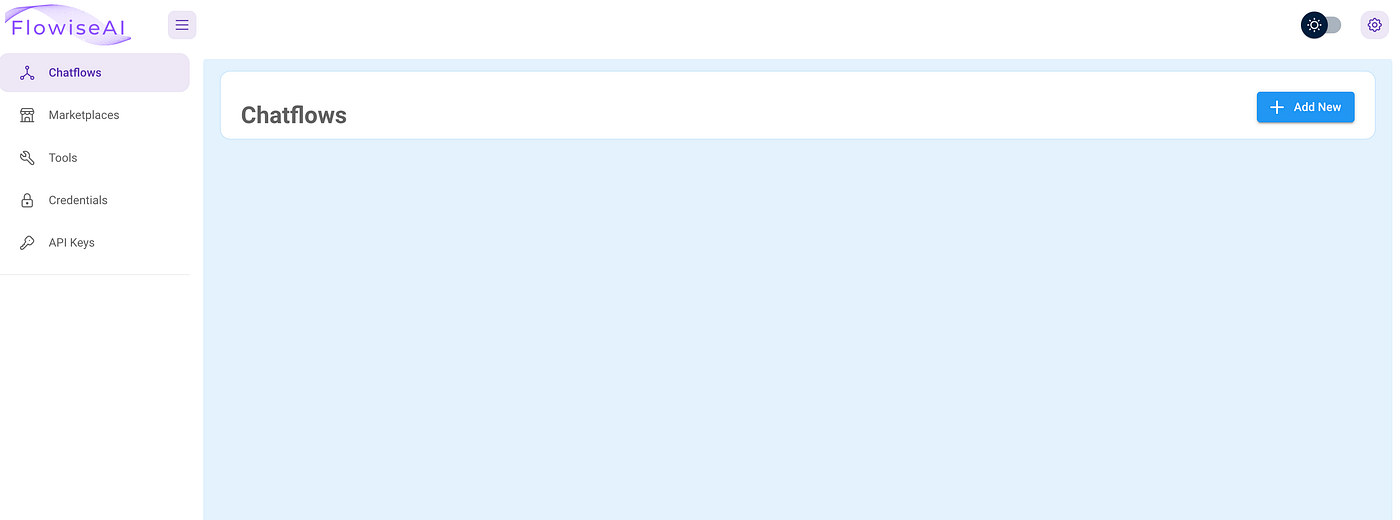
- Click the “+Add” button on the Flowsie homepage
- Click the “gear” button and select “Load Flow”
- Select the above file (dfw_summit_chatflow.json) you created
- Click the “disk” icon to save and name your ChatFlow.
With these 2 servers running (ChromaDB & Flowise), you can ask questions about your local data with the Chatbot app and webpage.
Click the “dialog balloon” to start your ChatBot.
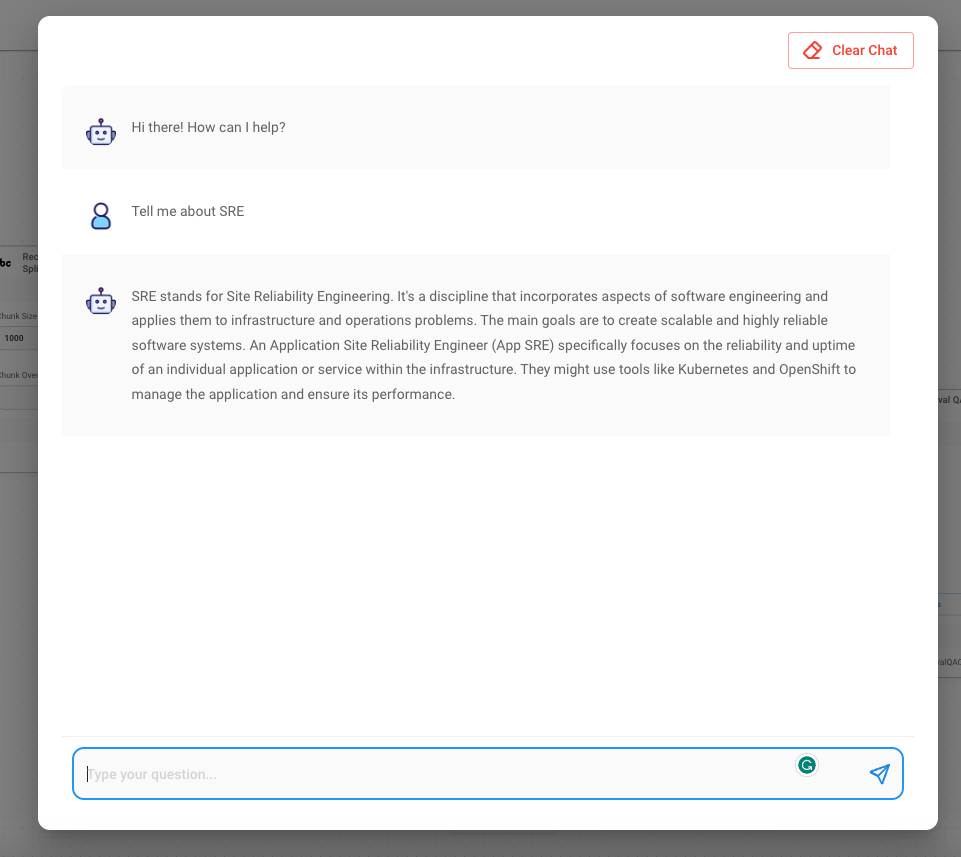
You can change the URL in the Cheerios component to any web page to use that data instead. I’ll leave it for you to experiment with other web pages.
Summary
In Episode 3: Building a Generative AI Containers with Podman we did the following:
Explored creating Generative AI environments in containers using Podman. Requires a Fedora system with Python, pip, and Podman installed.
Create a local Python virtual environment with Python packages: chromadb, langchain, beautifulsoup4, lxml, & openai installed. Also explained the benefits of using a PVE.
Built a chromadb container from Git source using a Containerfile. Included requirements.txt file with specified Python package versions for ChromaDB. Added a container_entrypoint.sh to define the entry point for the container, using uvicorn to run the ChromaDB application. Explaned the use of uvicorn as a lightweight ASGI server suitable for running Python web applications.
Created volumes for ChromaDB (chromadb-chroma and chromadb-index_data) and Flowise (flowise-volume).
Started a ChromaDB server and. Flowsie Server running in containers with Podman
Created your first Flowise ChatFlow using our ChromaDB as a local data source. Interact with the ChatBot app and webpage to ask questions about local data.
Next in the Series — Generative AI on OpenShift Series — Episode 4 — Setting Up a Vector Database with Podman and OpenShift
Episode 4 Topics:
- OpenShift Deployment Dynamics: Learn about scaling, load balancing, and high availability configurations.
- Integrate Flowise container insights for improved operational visibility.
- Monitoring Mastery: Dive into effective monitoring and logging practices for containers on OpenShift.
- Secure Containers, Smart Storage: Enhance security with access controls and OpenShift storage management for Vector Database containers. Ensure a robust and fortified data environment.
- OpenShift Ecosystem Insights: Leverage OpenShift Operators for efficient orchestration and explore storage solutions.
- Optimizing Performance: Explore resource management, CPU and memory considerations, and container optimization.
Helpful links:
Red Hat Developers Website — Excellent source for developers of all stripes. Great articles and focus on creating something useful in a short amount of time.
Podman — Everything you need to run Podman on your local development system, be it Linux, Windows, or Mac OS.
OpenShift, OpenShift AI/ML, and OpenShift Data Science — Power tools for container orchestration and building business tools that provide a competitive advantage.
Epic discussion of GenAI on OpenShift 4. by David Kypuros, Bobby Johns, and Jason Nagin.